 HubSpot
 Attio
AttioDiscord notifications from HubSpot and Attio workflows
Conncord adds a Send Discord message step to HubSpot and Attio workflows. When a workflow reaches it, Conncord posts your message to the Discord channel you picked, with CRM fields like the deal amount or contact name filled in.
Updated
Trigger
Deal stage changes
Conncord
Assign Discord role
Conncord
Send Discord message
maya Today at 9:41
anyone tried the new onboarding flow yet?

ConncordAppToday at 9:42
🎉 New customer: Acme Inc
Welcome aboard, @jordan! Your customer channels are unlocked.
Any trigger your CRM has
Deals, forms, lifecycle changes, renewals, recurring schedules: if a workflow can start on it, it can post to Discord.
Messages with real data
Insert HubSpot properties or Attio attributes into the text. Formatting is sent as Discord markdown.
Failures that don't break workflows
If Discord refuses a message, the step fails with a plain-language reason and your workflow continues or branches.
Recipes
What teams set up first
Each works with HubSpot and Attio.
When
a deal moves to Closed won
Then
post a celebration in #wins
When
a demo request form is submitted
Then
alert #sales with the company name
When
a deal over $10k is created
Then
ping the account executive
When
a renewal is 30 days away
Then
notify #customer-success
When
a recurring workflow runs on Monday
Then
post the weekly pipeline reminder
When
a customer churns
Then
share the reason in #retention

In the product
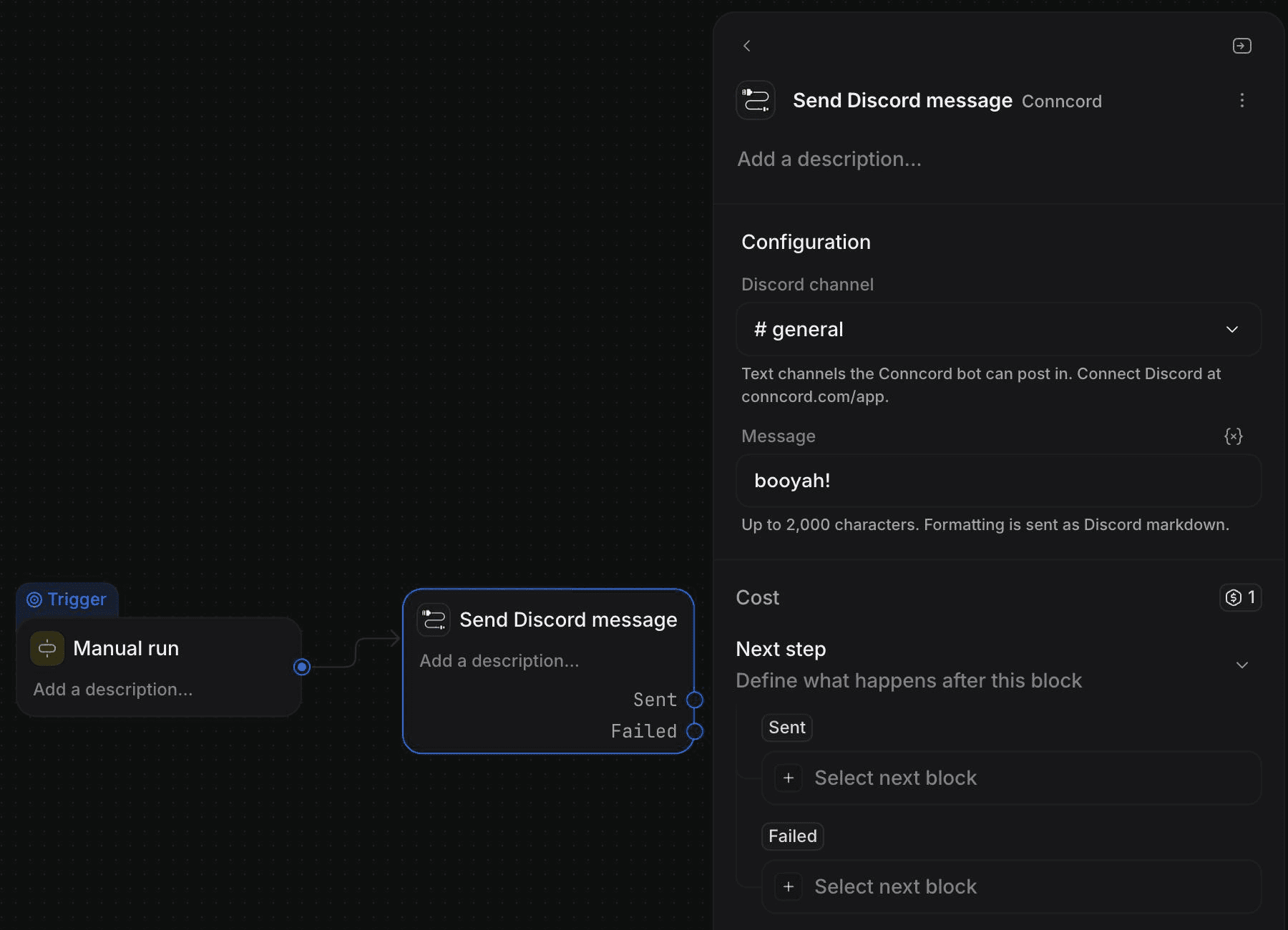
See it inside Attio
How it works
Set up in three steps
- 1
Connect HubSpot or Attio and add the Conncord bot to your Discord server.
- 2
In a workflow, add the Conncord step to send a Discord message.
- 3
Pick the channel, write the message with CRM fields, and turn the workflow on.
With HubSpot
- The Send Discord Message action works in workflows for any record type: contacts, deals, companies, tickets.
- Use HubSpot properties and mentions in the text.
- On failure the action returns errorCode and errorMessage outputs you can branch on.
With Attio
- The Send Discord message step lists the text channels the bot can post in.
- Write the message with record attributes, up to 2,000 characters.
- The step has Sent and Failed outcomes, with error_code and error_message on failure.
The difference
Discord messages, with and without Conncord
Without Conncord
- Someone copies wins from the CRM into Discord by hand
- Alerts arrive late, or not at all
- A Zap per alert, each billed per task
With Conncord
- The workflow posts the moment the CRM changes
- Messages carry the deal, owner and amount
- One flat plan, failures explained in plain language
“Love it. It's quick, friendly to use. Support is always quick and helpful. New features constantly being added and you can even make your own personal feature requests.”
FAQ
Questions, answered
Keep exploring
Works well with
Connect Discord to your CRM today
Link members, automate roles and send messages from HubSpot or Attio workflows. Live in minutes.
7-day free trial · No credit card required
5.0· 4 reviews on HubSpot