
Welcome message
Post a Discord welcome message with a Register button so new members who skip your invite link are still linked to HubSpot contacts or Attio people.
The welcome message links members who join your Discord server without your invite link. When someone joins, Conncord posts a message that mentions them, with a Register button. They enter their email and name, and Conncord links them to a HubSpot contact or Attio person.
It's included in the trial, Pro and Scale plans.
Set it up
- In your Conncord dashboard, finish Add your branding first. The welcome message uses your company name.
- Open Welcome message and turn on Send a welcome message.
- Pick the Channel to post in. Channels Conncord can't post in are marked "(Conncord can't post here)". See Discord bot setup.
- Edit the Message, then click Save.
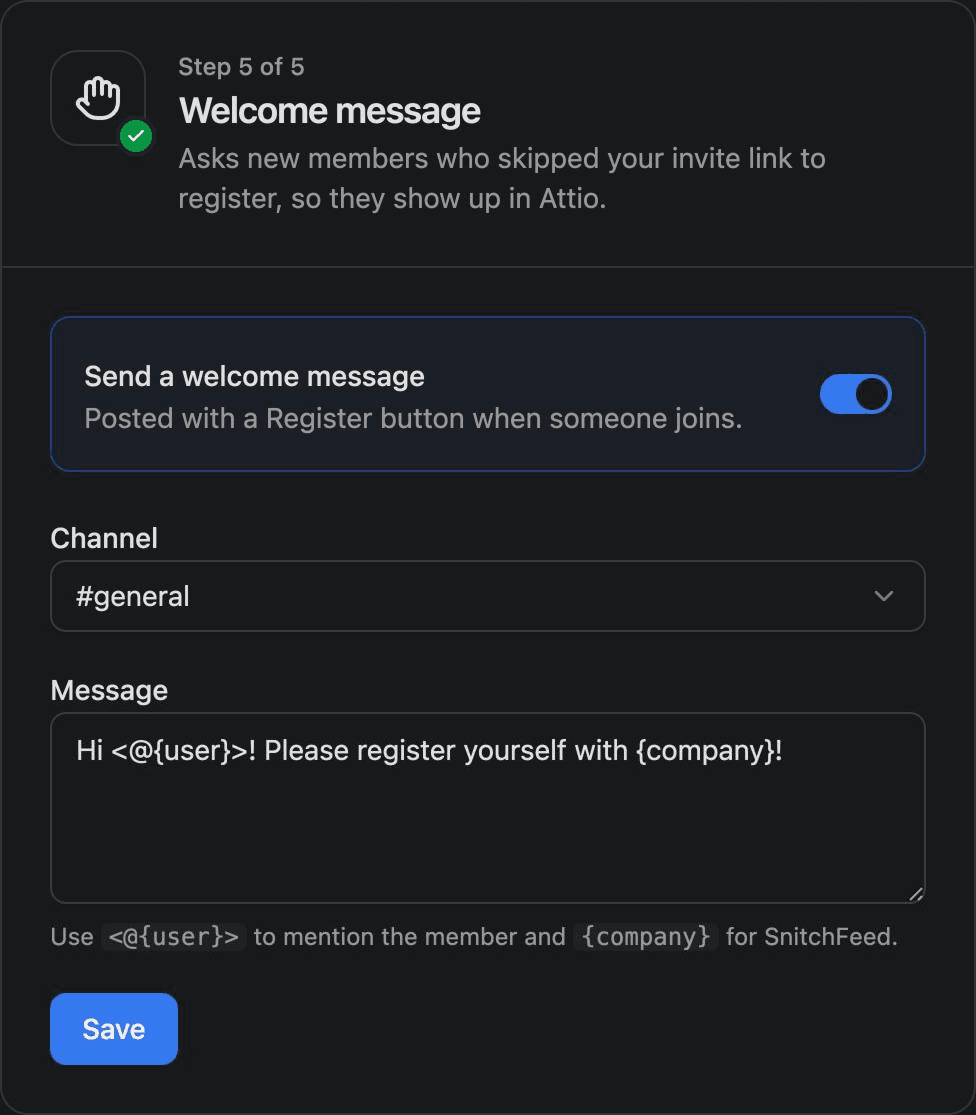
The default message is:
Hi <@{user}>! Please register yourself with {company}!| Placeholder | Becomes |
|---|---|
<@{user}> | A mention of the new member |
{company} | Your company name from Add your branding |
What members see
- The member joins your server and sees your message with a blue Register button.
- They click Register. A form titled Register to proceed asks for the email they use with your company, their first name and their last name.
- They submit it and see "Thanks, @their-name! You're registered." Only they can see the form and the replies.
Only the member the message mentions can register with its button.
How the member is linked
Conncord looks for a HubSpot contact or Attio person with the email they entered. If there's one, the member is linked to it. If not, Conncord creates one. It fills in the name only where the record's fields are empty, and never overwrites existing data. Then it saves the member's Discord ID and username on the record.
When the welcome message isn't sent
Conncord skips the welcome message when:
- The member joined through your invite link or Layover. They're already linked.
- The member was linked before and rejoined your server.
- Your plan doesn't include welcome messages (Starter).
- No CRM is connected, or your branding or channel isn't set.
Last updated on
Link Discord members to Attio people
Match Discord server members to Attio people by email with Conncord's invite link, Layover and welcome message, and save their Discord details.
Layover
Layover is a branded page shown before people join your Discord server through your Conncord invite link. It can ask for an email to match CRM records.